
Preview files without downloading
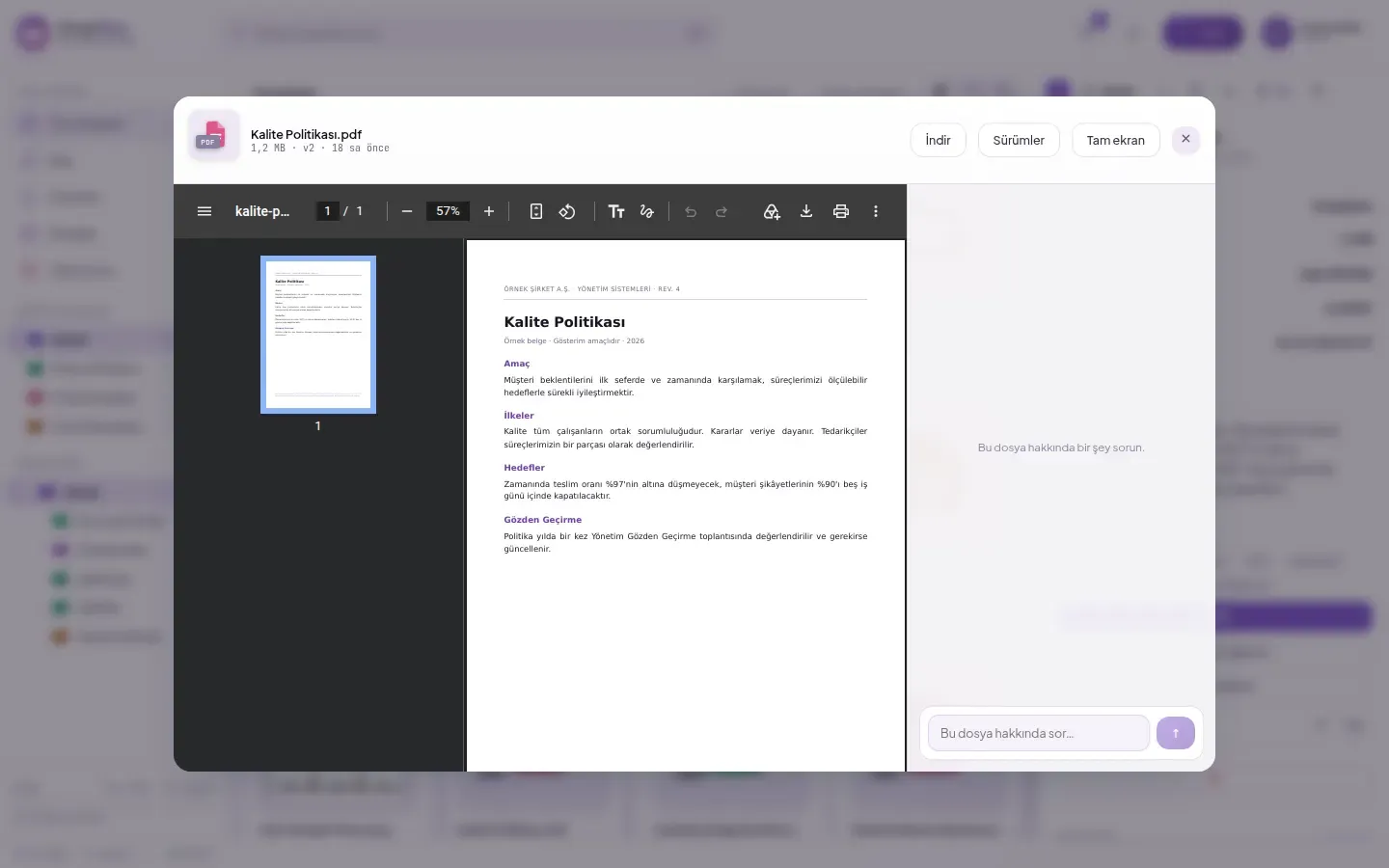
SmartFiles file preview is the viewing layer that opens documents, tables, images, and videos in the browser without downloading them to the computer. PDF, text, and code files, CSV tables, PNG, JPEG, GIF, WebP, and SVG images, and videos open directly; Word, Excel, and PowerPoint documents are previewed with administrator approval. You can also ask questions about the document using AI in the preview window.
Why is file preview safer than downloading?
File preview shows the content in the browser without downloading the document. Each downloaded file creates a new copy on a disk outside the organization's control: when permission is revoked, that copy remains.
In preview, the document remains within SmartFiles' permission rules. Viewing links are short-lived and expire within a few minutes; even if the link is forwarded to someone else, no permanent access path is created. The "Download" button appears for every file type when downloading is required.
Which files are previewed in the browser?
Five file families open in the browser in SmartFiles: images, videos, PDF documents, text and code files, and Office documents. Each family is displayed with its own view.
| File family | Formats | How to display |
|---|---|---|
| Visual | PNG, JPG/JPEG, GIF, WebP, SVG | Opens in full size; also appears as a thumbnail in the file list. |
| Video | MP4, WebM | Played with the browser's player without downloading. |
| Opens in the browser with its pages. | ||
| Text and code | TXT, MD, JSON, LOG, XML, YAML, INI, SQL, and common programming languages | As plain text, up to 2 MB; Turkish characters are displayed correctly. |
| Table | CSV | As a table with rows and columns; first 500 rows. |
| Office | Word, Excel, PowerPoint (doc, docx, xls, xlsx, ppt, pptx) | When enabled by the administrator, for documents up to 10 MB. |
Why do Turkish characters not appear corrupted?
SmartFiles checks the character encoding of text files before previewing. Files coming from old systems and saved with Turkish Windows encoding are also read correctly; letters 'ş', 'ğ' and 'ı' do not turn into question marks.
CSV files exported from accounting and ERP software therefore open as tables with correct headers in preview. There is no need to open a spreadsheet program to view the contents of a file.
How to preview Word, Excel, and PowerPoint files?
Office file preview is optional: Word, Excel, and PowerPoint documents open in the browser when the organization administrator enables Office preview. This feature sends the document content to an external online viewer, so it is disabled by default; the decision and responsibility lie with the organization.
When enabled, documents up to 10 MB are displayed with formatting preserved. When disabled, documents can still always be downloaded; Word and Excel documents are summarised by AI and questions can be asked about their content. The setting is toggled with a single button.
How to understand content without opening the file?
Images appear as thumbnails in the file list; alongside documents, short summaries generated by AI at upload time are displayed. This allows files searched within a folder to be found without opening them one by one.
Switches between list grid, detailed list, and tile views. Total size and file count of folders including subfolders are displayed; details, notes, and versions of the selected file open in the right panel.
The preview window closes with the Esc key and the list stays where it was. Browsing dozens of documents in a busy folder takes much less time than downloading and opening each one.
Preview in the mobile app
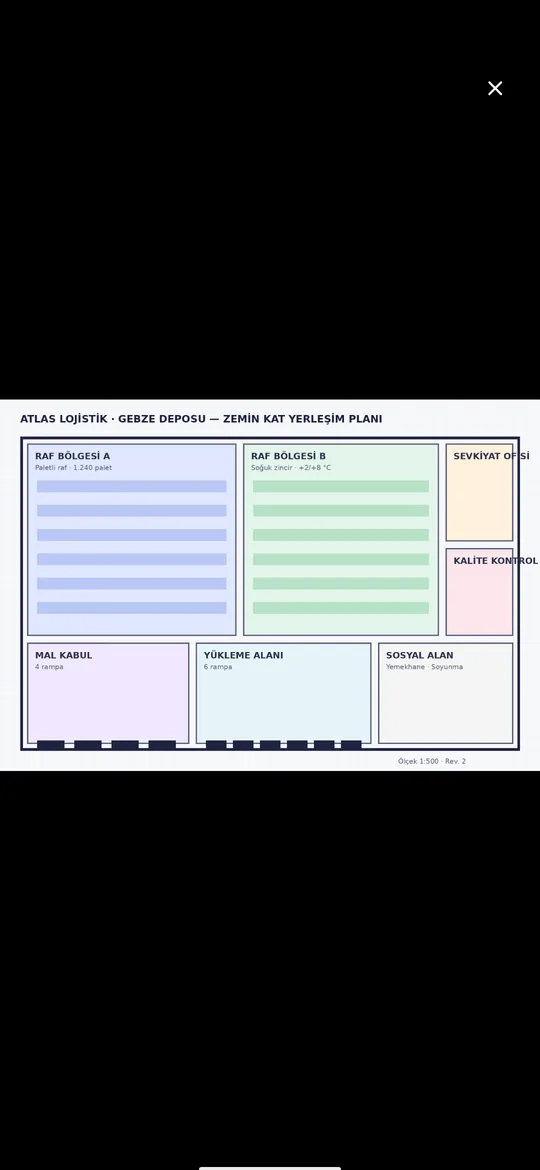
Images open in full screen in the SmartFiles mobile app; a storage layout plan or a photo taken on-site is reviewed without downloading.
Who can see the preview?
Preview is available to those with "Read" permission in the storage area where the file resides. Users without read permission do not see the area in the sidebar at all, and thus cannot access previews of files within it.
Permissions are granted per person or department, and changes reflect instantly on open screens. When a person's permission is revoked, their files are also removed from that area's screen. Details: area-based authorisation.
Can questions be asked about the document during preview?
Yes. The chat area stays on the right of the preview window and remains the same as the main screen chat. With the document open, you can ask questions like “How many days’ notice must be given for termination?”; the answer is generated from the document’s own text.
Chat is open to persons with the "AI" permission and reads only files the person has view permission for. Details: AI document analysis.
How to view old versions and email attachments?
Previous versions of a file can be downloaded individually and restored if needed; the list shows which version is current. Details: file version history.
The same viewing understanding after download applies to the corporate email product SmartMail: mail attachments are previewed without downloading. The collaboration of the two products archiving email attachments described on the page.
How to preview a file step-by-step?
Double-click the file or select it and click Preview in the detail panel.
Click Full screen to enlarge the document.
With preview open, use the ← and → keys to navigate to the previous and next files in the folder.
If AI is enabled, ask the document a question by typing into the box next to the preview window.
If you need to download the file to your computer, click Download.
Frequently asked questions
Which files open without downloading?
PDFs, text and code files, CSV tables, PNG, JPEG, GIF, WebP and SVG images and MP4/WebM videos are displayed directly; text files saved with Turkish Windows encoding are also read correctly.
Is the file downloaded for preview?
No. Preview displays the file in the browser without downloading it; viewing links are short-lived and expire within a few minutes.
Can multiple files be downloaded together?
Yes. Select files and click the Download button at the top to download them all at once as a ZIP file, preserving the folder structure; up to 500 files and 2 GB total per download.
Can questions be asked about the document in preview?
Yes. If AI is enabled and you have AI permission, you can ask questions about the document in the box next to the preview window; the response is based on the document's content.