 Gantt chart
Dependency-driven plan, visible critical path
The SmartPM Gantt chart is a planning view that displays tasks on a timeline and links them using four dependency types. Drag tasks, create links between them. When one task extends, dependent tasks shift automatically; tasks determining the project end date are marked in red.
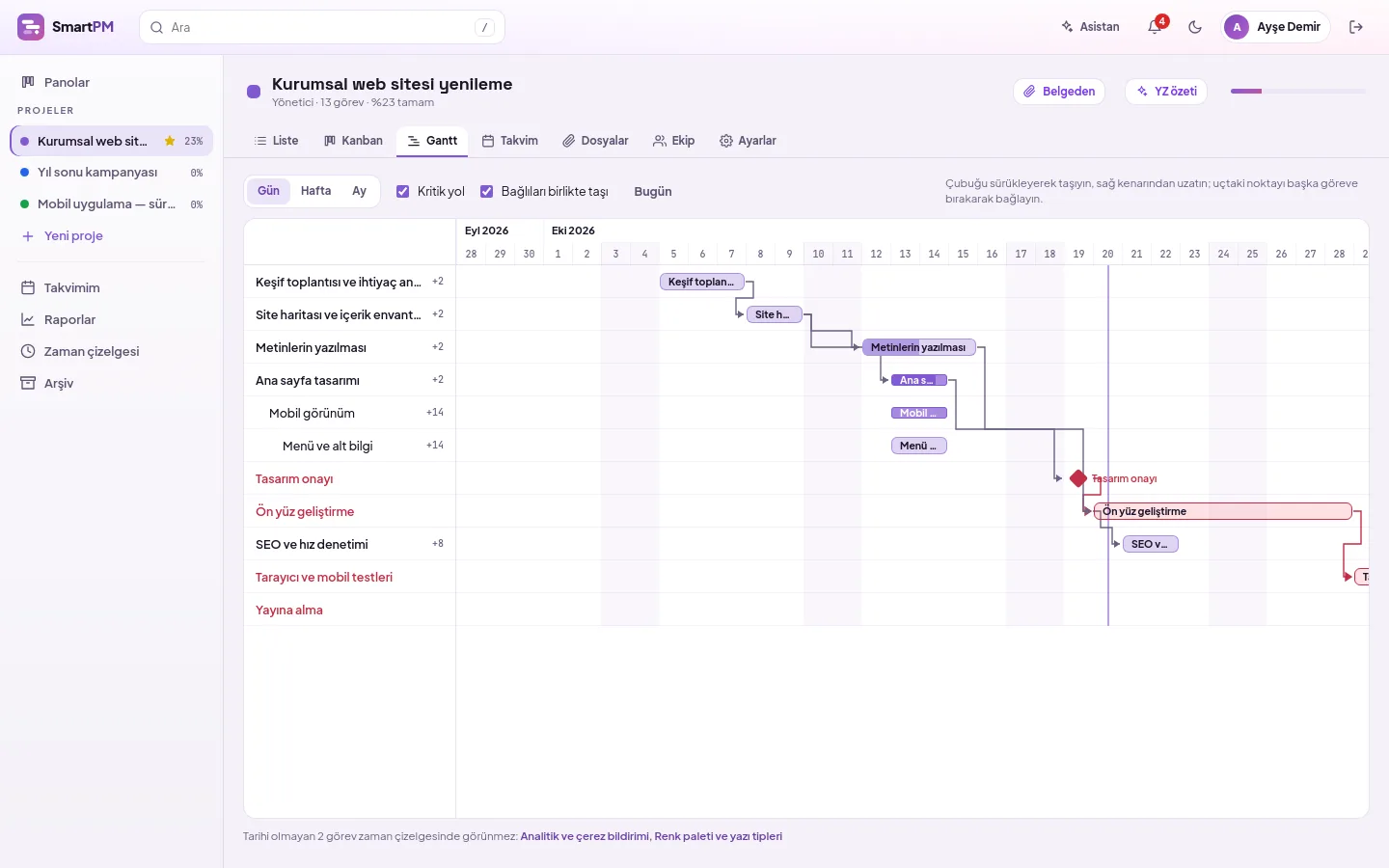
Change date from the bar
Dragging the bar moves it along with the task duration; pulling from the right edge extends it. If the start falls on a weekend, it snaps to the first working day.
- Move dependents together: successors and subtasks shift by the same number of working days; they revert when moved back
- Subtasks indented by level
- Day, week, and month scales
- Return to today with the Today button
- Tasks without dates are listed below the chart
Four link types, lag in working days
Dropping a point at the end of one bar onto another creates a Finish-to-Start link. Other types and lag can be selected from the task panel.
- Working days per project: Saturdays are working days in Saturday-working projects
- Finish-to-Start, Start-to-Start, Finish-to-Finish, Start-to-Finish
- Lag in working days; negative value pulls earlier
- Links creating cycles are not accepted
Plan self-corrects
When a predecessor extends or shifts, successors are pushed forward while preserving their durations; dates already appropriate are untouched. The screen reports how many tasks have shifted.
- Pushes only forward, preserves later dates you provided
- Weekends are not counted as working days
- Plan does not get confused if two people move simultaneously
Which lag causes shifting?
Tasks and links on the critical path are drawn in red. Next to other tasks, their float is shown—i.e., how many working days they can delay without affecting the finish date.
- Critical path view toggles on/off with one click
- Float is shown in working days
- Milestones are diamond-shaped
Frequently asked questions
What dependency types are available?
SmartPM supports four link types: Finish-to-Start, Start-to-Start, Finish-to-Finish, and Start-to-Finish. A lag (in working days) can be applied to each link; negative lag allows a successor to start before its predecessor finishes.
Does automatic shifting undo changes?
No. SmartPM’s plan only pushes forward: if a predecessor extends, successors shift, but if a predecessor shortens or a link is removed, successors retain their original dates. This ensures manually entered dates are not changed without notice.
How is the critical path calculated?
Working backwards from the project’s latest finish date, the latest possible finish day for each task is determined. The difference in working days between this date and the task’s actual finish is float; tasks with zero float are on the critical path and are shown in red.
View your plan in the Gantt chart
Let us plan the setup suitable for your organization.